GitHub - ensolabs/codimg: Transform your code blocks to svg! · GitHub
/" data-turbo-transient="true" />
Skip to content
Search or jump to...
Search code, repositories, users, issues, pull requests...
-->
Search
Clear
Search syntax tips
Provide feedback
--><br>We read every piece of feedback, and take your input very seriously.
Include my email address so I can be contacted
Cancel
Submit feedback
Saved searches
Use saved searches to filter your results more quickly
-->
Name
Query
To see all available qualifiers, see our documentation.
Cancel
Create saved search
Sign in
/;ref_cta:Sign up;ref_loc:header logged out"}"<br>Sign up
Appearance settings
Resetting focus
You signed in with another tab or window. Reload to refresh your session.<br>You signed out in another tab or window. Reload to refresh your session.<br>You switched accounts on another tab or window. Reload to refresh your session.
Dismiss alert
{{ message }}
ensolabs
codimg
Public
Notifications<br>You must be signed in to change notification settings
Fork
Star
master
BranchesTags
Go to file
CodeOpen more actions menu
Folders and files<br>NameNameLast commit message<br>Last commit date<br>Latest commit
History<br>11 Commits<br>11 Commits
review
review
src
src
static
static
Makefile
Makefile
README.md
README.md
decode.go
decode.go
elm-watch.json
elm-watch.json
elm.json
elm.json
go.mod
go.mod
go.sum
go.sum
highlight.go
highlight.go
main.go
main.go
View all files
Repository files navigation
Read more on https://cekrem.github.io/posts/codimg/, or try the live demo @ https://codimg.alwaysdata.net
This project solves a very specific problem, namely being unable to successfully copy/paste code examples into the Webflow WYSIWYG our consultancy blog (sadly?!😅) runs on. Leaving the "why" aside, it transforms code to a syntax highlighted SVG that you can embed anywhere!
And it's completely stateless and pure: code in (as part of query param) -> svg out!
Though I cannot promise to always keep this live or to never have a breaking change, in theory this could/would work "forever" without having to ever store any data.
Usage
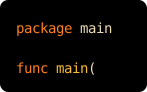
Hit /code.svg with your code in the input query param and (optionally) a lang to pick the syntax highlighting:
https://codimg.alwaysdata.net/code.svg?lang=go&input=package%20main%0A%0Afunc%20main()%20%7B%7D
input is just URL-encoded code, so you can embed the result anywhere an image goes:
">img<br>src="https://codimg.alwaysdata.net/code.svg?lang=go&input=package%20main%0A%0Afunc%20main()%20%7B%7D"<br>alt="code"<br>/>
)">%20%7B%7D>)
Renders like this:
For larger snippets, input also accepts base64-encoded, deflate-compressed code (transparently auto-detected), which keeps URLs short. lang accepts any Chroma lexer name (go, python, elm, js, ...); leave it off to auto-detect.
You can see it all in practice in the playground.
About
Transform your code blocks to svg!
Resources
Readme
Uh oh!
There was an error while loading. Please reload this page.
Activity
Custom properties
Stars
stars
Watchers
watching
Forks
forks
Report repository
Releases
No releases published
Packages
Uh oh!
There was an error while loading. Please reload this page.
Contributors
Uh oh!
There was an error while loading. Please reload this page.
Languages
Go<br>48.7%
Elm<br>44.4%
HTML<br>4.2%
Makefile<br>2.7%
You can’t perform that action at this time.